Some time ago I wanted to quickly spawn a local Kubernetes cluster to test something while I was practicing for CKA exam.
I decided to give Kind a go - It’s a tool that allows you to run k8s cluster using a regular container runtime (such as docker or podman).
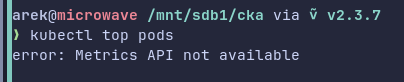
Everything was kind of smooth experience until I needed to run kubectl top pods.
I wasn’t able to successfully execute it, as to get any information about pods (and nodes) resource usage in a cluster, I had to install Metrics Server. And that’s the moment were an issue appeared…
TLDR
You can install metrics-server by appling the manifest:
kubectl apply -f https://github.com/kubernetes-sigs/metrics-server/releases/latest/download/components.yaml
And patching args for the container:
kubectl patch -n kube-system deployment metrics-server \
  --type=json \
  -p '[{"op":"add","path":"/spec/template/spec/containers/0/args/-","value":"--kubelet-insecure-tls"}]'
Cluster with Kind
Before going through resolving, let’s go through Kind setup.
To create cluster with one Control Plane and two Worker nodes, you just need to define a YAML file (named kind.yaml in my case):
kind: Cluster
apiVersion: kind.x-k8s.io/v1alpha4
nodes:
- role: control-plane
- role: worker
- role: worker
And run the following command:
kind create cluster --config kind.yaml --name my-cluster
After a while you should be informed that the cluster was created:
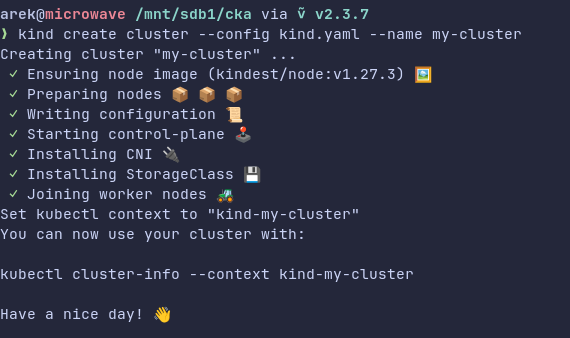
And that you need to switch context with:
kubectl cluster-info --context kind-my-cluster
Okay, we have the cluster, now it’s time for…
Metrics Server
Paraphrasing the documentation, Metrics Server is an API extension which exposes information about CPU and memory usage. It is consumed by objects meant for auto-scaling purposes (HorizontalPodAutoscaler and VerticalPodAutoscaler). Besides that, Metrics API is being queried when you run kubectl top command.
Metrics Server (also known as metrics-server) can be easily installed in your cluster. You can either use the official Helm chart, or simply apply YAML manifest with:
kubectl apply -f https://github.com/kubernetes-sigs/metrics-server/releases/latest/download/components.yaml
Metrics Server + Kind = 💔
Well, you may think, Arek, there’s nothing to write home about! You just need to apply the thing, and you should be able to run your kubectl top command. Right?
Hm, no. Unfortunately, there’s one issue…
If you try to run kubectl top, you will get the following error:
Then, when you check the pod’s status, you will notice that something is wrong there:
kubectl get pods -n kube-system -l k8s-app=metrics-server

The readiness probe fails:
kubectl -n kube-system describe deployments.apps metrics-server

Why is that happening? Let’s check the logs:
kubectl -n kube-system logs -l k8s-app=metrics-server
E0206 18:53:32.034661       1 scraper.go:149] "Failed to scrape node" err="Get \"https://172.19.0.4:10250/metrics/resource\": tls: failed to
 verify certificate: x509: cannot validate certificate for 172.19.0.4 because it doesn't contain any IP SANs" node="kind-control-plane"
I0206 18:53:33.042805       1 server.go:191] "Failed probe" probe="metric-storage-ready" err="no metrics to serve"
Well, there’s an issue with certificate verification, nice…
One-liner fix?
In Kind’s GitHub issues you may find the one related to our problem: Resource Metrics API (metrics-server) #398 .
In one of the comments there I found this possible solution - Execution of the following command:
kubectl patch deployment metrics-server -n kube-system \
  -p '{"spec":{"template":{"spec":{"containers":[{"name":"metrics-server","args":["--cert-dir=/tmp", "--secure-port=4443", "--kubelet-insecure-tls","--kubelet-preferred-address-types=InternalIP"]}]}}}}'
This command updates the flags used by the process in the container.
Notice that there’s --kubelet-insecure-tls among them. With this flag Metrics Server should ignore CA validation (which means that self-signed cert should work fine).
However, it didn’t fixed my issue. The new container was still failing:

Note: The solution probably worked for the older versions of metrics-server.
A solution?
I decided to fix that on my own. Based on the patch command above, I wanted to “dynamically” append only --kubelet-insecure-tls flag, so I wouldn’t “mutate” the rest of the flags (which were set in the original definition in the manifest).
My plan was to get the args defined for the current container, append --kubelet-insecure-tls to them, and then patch it.
So, here are the steps. At first, we need to get the definition of the container. This can be done with this command:
kubectl get -n kube-system deployment metrics-server \
  -ojsonpath='{.spec.template.spec.containers[0]}'
This way we get JSON object which describes the container in a Pod defined in metrics-server Deployment:

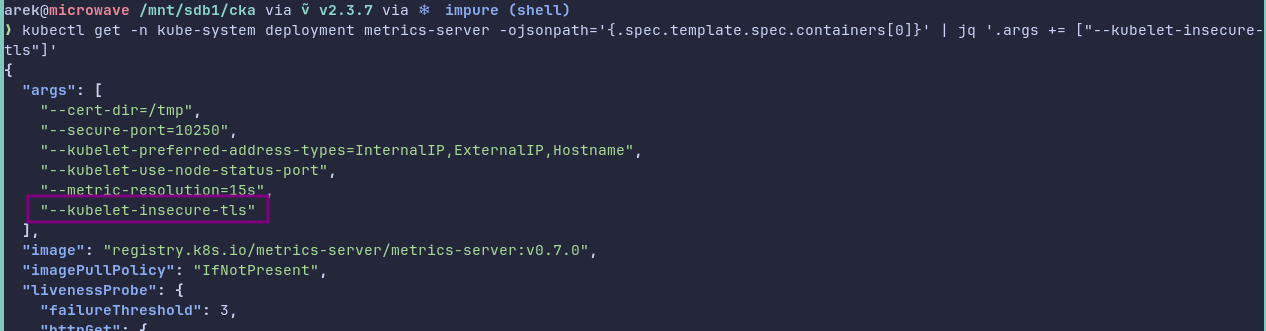
Next, we need to append the flag to the args array. To do that, we can pipe the result to jq in the following way:
kubectl get -n kube-system deployment metrics-server \
  -ojsonpath='{.spec.template.spec.containers[0]}' \
  | jq '.args += ["--kubelet-insecure-tls"]'
As expected, the output contains --kubelet-insecure-tls flag:
Then, we can “reduce” the JSON object, so it only contains name of the container, and the updated args. We can use jq again:
kubectl get -n kube-system deployment metrics-server \
  -ojsonpath='{.spec.template.spec.containers[0]}' \
  | jq '.args += ["--kubelet-insecure-tls"]' \
  | jq -c -r '{"name":.name,"args":.args}'
And we get our desired JSON object:

Let’s put the output in a variable:
updated_args=$(kubectl get -n kube-system deployment metrics-server \
  -ojsonpath='{.spec.template.spec.containers[0]}' \
  | jq '.args += ["--kubelet-insecure-tls"]' \
  | jq -c -r '{"name":.name,"args":.args}')
And prepare a JSON object (for Deployment spec) in a separate variable:
patch="{\"spec\":{\"template\":{\"spec\":{\"containers\":[${updated_args}]}}}}"
Finally, it’s time to run our patch command:
kubectl patch deployments.apps -n kube-system metrics-server -p $patch

Let’s check if Pod is running:
kubectl get pods -n kube-system -l k8s-app=metrics-server

Now you should be able to run top command without the error:
kubectl top pods -n kube-system
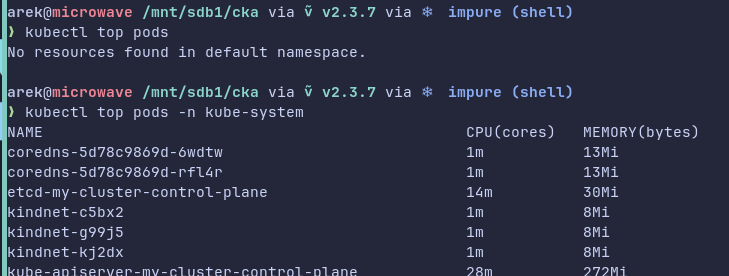
Yay, awesome! 🎉
Working one-liner!
After I got metrics-server working on my Kind cluster, I felt kinda proud of myself, as I figured out how to do it without “mutating” the flags.
Then, I stumbled upon avoidik’s comment in a GitHub gist linked under the GitHub issue:
one-liner
kubectl patch -n kube-system deployment metrics-server --type=json \
  -p '[{"op":"add","path":"/spec/template/spec/containers/0/args/-","value":"--kubelet-insecure-tls"}]'
And I was simply amazed that there’s a one-liner fix which doesn’t “mutate” the flags!
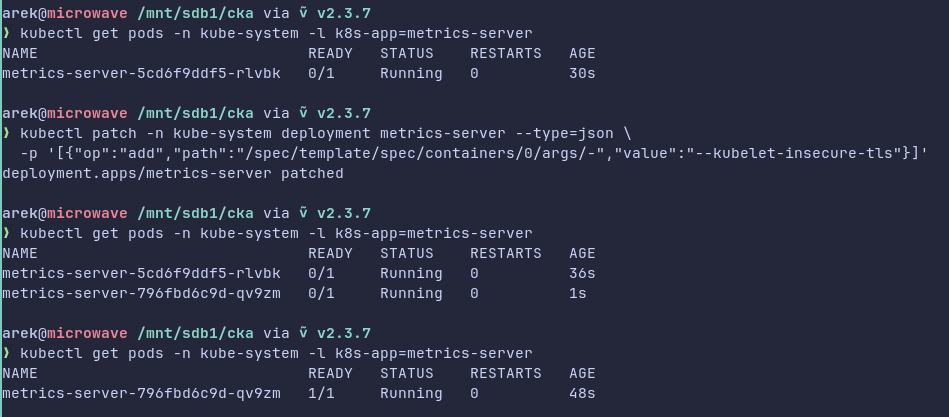
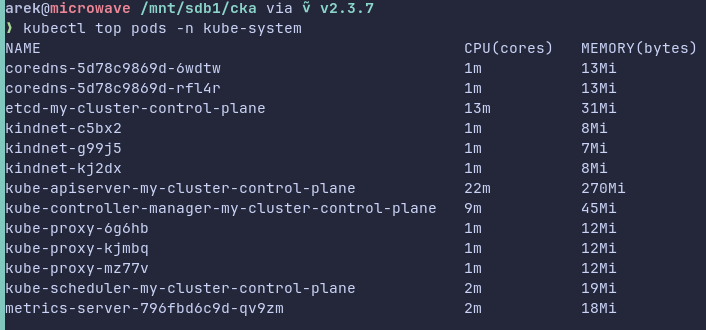
This one-liner utilizes this strange "op": "add" piece of JSON. I wanted to check this thing out as it was the first time I’ve seen it. I started to search Kubernetes documentation, but I could only find one insignificant mention of op in kubectl patch’s example section.
Although, I found something interesting somewhere else - in RFC6902 JavaScript Object Notation (JSON) Patch. This document describes JSON Patch which is a format for expressing a sequence of operations to apply to a target JSON document and it’s suitable for use with the HTTP PATCH method.
Inside of the specification we can find information about the “add” operation and its behavior.
If the target location (path in JSON) is:
- An array index, then a new value is inserted into the array at that index (and existing element at and after the index are shifted one position to the right)
- A key that doesn’t already exist, then the key with value is added to the object
- A key that already exists, then the value is replaced by the new one
The string passed to the patch command:
[{
  "op": "add",
  "path": "/spec/template/spec/containers/0/args/-",
  "value": "--kubelet-insecure-tls"
}]
In our case, in the one-liner there’s no index (for args) in the path. That’s because it uses - instead, and it has a special effect:
If the “-” character is used to index the end of the array (see [RFC6901]), this has the effect of appending the value to the array.
Summary
To sum up, initially this post was supposed to be shorter, but I found a better solution than mine - The concise one-liner patch which utilizes the add operations. To understand why and how that operation, I had to dig a little bit into RFC document.