If you use Obsidian, and you are used to using Vim, then you’ve probably enabled Vim key bindings in Obsidian’s settings.
And everything was fine until you wanted to yank (copy with y) something from your notes, and paste in a different place (for example, in a browser).
Your system clipboard didn’t paste yanked text, right?
Well, you should expect that it won’t work - Yanking to system clipboard is not configured by default in Vim, and apparently, it’s not configured in Obsidian either.
Okay… But can we “fix” that?
TLDR
Yes, we can!
Install Vimrc Support plugin, and then create .obsidian.vimrc in the root of your Obsidian vault with the following content:
set clipboard=unnamedplus
Finally, restart Obsidian. That’s all!
If you want to dive a little bit into yanking, continue reading!
Yanking in Vim
Let’s start from the beginning. In Vim you can yank content. That basically means that you can “copy” text in the Normal mode (with y) , so you can then paste it with p.
Registers
The yanked text is stored inside of a Vim register, and there are multiple registers. Each of them can be accessed with " and an “assigned character”.
For example, the default register called unnamed can be accessed with "" because its assigned character is ".
Another example, there’s : register which contains the most recently executed command - You can access it with ":.
While yanking or pasting, you can pass the information about the register you want to use. For instance, if you want to paste the command you’ve just executed, you can click ":p. For unnamed register (which is the default one) you can use ""p, or simply p.
System Clipboard
Among the registers there are 2 special ones: + and *. They are designed to be used for system clipboard. While for Windows and MacOS both registers work the same, there’s a difference on Linux.
On Linux, + is used for the “regular” clipboard (Ctrl+C, Ctrl+V). Whereas * serves for “mouse selection” clipboard - You can select text with your mouse, and then the content can be pasted with the middle-click.
So basically you have two separate clipboards on Linux, but normally when you think about the clipboard, you probably mean the 1st one (+).
Therefore, to copy text into your system clipboard in Vim, you need to click "+y (yank to + register).
Running "+y just to copy text may be tedious. Cannot "+ be the default register?
Well, it can - You just need to add this into your .vimrc:
set clipboard=unnamedplus
Note: Your Vim needs to be complied with clipboard support in order to use the system clipboard. You can check if your installation includes this feature by running the following command in your Vim:
:echo has('clipboard')
If it returns 0, then it won’t work.
To get the “proper” Vim, you can install a GUI version, or add the support easily in NeoVim (run :help clipboard-tool for more information).
Yanking in Obsidian
Okay, so now we know how to configure yanking in Vim, but how can we do it in Obsidian?
At first, you need to install Vimrc Support plugin (GitHub repo). It allows you to load Vim commands from .obsidian.vimrc (you need to create that file in the root directory of your vault).
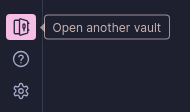
To find your vault’s path you can click Open another vault (at the bottom left corner):
 Click 3 dots, and select Reveal vault in system explorer:
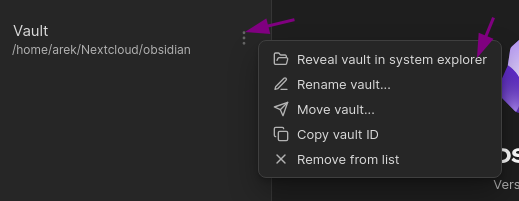 Your system file explorer should be opened - Now you need to open the directory with your vault, and create
 .obsidian.vimrc with the following content there:
set clipboard=unnamedplus
Finally, restart Obsidian.
Now you can enjoy yanking to system clipboard!
Summary
Using Vim keybindings can be second nature to some people. Fortunately, Obsidian provides support for them natively. It lacks some customization though.
Yanking to system clipboard is one of the examples. However, it can be easily fixed using the Vimrc Support plugin which allows us to add custom Vim commands (like set clipboard=unnamedplus) in configuration file to meet our needs.
Reference
Some resources that I used while writing, but I haven’t linked anywhere above: